
Table of Contents
I remember logging into my remote office setup three years ago, thinking a strong password was enough. I was wrong. Today, the digital landscape has shifted, and the threats facing remote professionals are far more sophisticated. Integrating cybersecurity best practices into your remote workflow is no longer optional—it is a necessity for survival.
The 2026 threat environment thrives on automated social engineering. These AI-driven attacks target your weakest link: human behavior. I have seen how quickly a single lapse in judgment can compromise an entire corporate network. We must evolve our defenses to match these advanced adversaries.
My goal here is simple. I want to provide you with actionable steps to harden your digital perimeter. We will explore how to protect your digital identity and ensure your professional assets remain secure. Let’s start by building a foundation that keeps you safe while you work from anywhere.
Securing Your Physical Access Points
When I first started working remotely, I treated my home office like a cozy retreat. I didn’t think twice about leaving my laptop open on the kitchen island while I grabbed a coffee. That, I learned, is a massive physical security blind spot.
In 2026, the term “cybersecurity” isn’t just about firewalls and software patches. It starts with the hardware sitting right in front of you. If an attacker gains physical access to your machine, your sophisticated passwords and VPNs are effectively neutralized.
Locking Down Your Digital Perimeter
The most effective physical defense is also the simplest: always lock your screen. Make it a non-negotiable habit to hit the lock command (Windows + L or Control + Command + Q) the moment you stand up. It takes one second and prevents unauthorized access by roommates, visitors, or even curious pets.
Furthermore, consider where you store your devices when the workday ends. If you work from a shared space, a small, lockable drawer or a secure cabinet is vital. Don’t leave devices in plain sight, especially near ground-floor windows. It sounds paranoid, but these habits protect the physical “key” to your company’s data.
Managing Hardware Assets Wisely
If you use a company-provided laptop, remember that it is a managed asset. Do not let family members or friends use it for casual browsing or gaming. Shared use introduces the risk of malware, unapproved software, and accidental data exposure that can compromise your professional reputation.
If your organization allows a BYOD (Bring Your Own Device) policy, ensure you have full-disk encryption enabled. This renders your data unreadable if your device is lost or stolen. Most modern operating systems offer this natively. Check your settings today to ensure encryption is active—it is your final line of defense against physical theft.
Advanced Authentication Protocols
I used to rely on a complex string of characters for every login. Then, I realized that even the longest, most complex password can be phished or intercepted. In 2026, we are entering the era of “passwordless” security. If you are still relying solely on static passwords, you are leaving the door wide open for attackers.
Moving Beyond the Password
The most significant shift in authentication is the move to passkeys. Built on the FIDO2 and WebAuthn standards, passkeys replace passwords with cryptographic keys unique to your device. When you log in, your device uses your biometrics—like a face scan or fingerprint—to authorize the request. The secret key never leaves your hardware, making it impossible for a hacker to steal it through a fake login page.
I recommend switching to passkeys on every platform that supports them. It’s not just more secure; it’s actually faster. You no longer need to scramble for your password manager or wait for a text message code that might never arrive. It is a seamless, phishing-resistant experience.
The Power of Adaptive Multi-Factor Authentication (MFA)
If a service doesn’t support passkeys yet, you must use Multi-Factor Authentication (MFA). But not all MFA is created equal. Avoid SMS-based codes if possible, as they are vulnerable to SIM swapping. Instead, use an authenticator app (like Microsoft Authenticator or Authy) or, for maximum security, a hardware security key.
Modern security systems now use Adaptive Authentication. This uses AI to analyze the context of your login, such as your location, device reputation, and typical behavior. If you log in from an unusual country or an unknown device, the system will automatically demand a “step-up” verification. This intelligent layer of protection ensures that you are only bothered when the system detects a genuine risk.
Network Hygiene & VPN Best Practices
When I travel for work, I love finding local cafes to set up shop. However, I learned the hard way that public Wi-Fi is essentially a digital “wild west.” Without proper precautions, every packet of data leaving your machine is potentially visible to anyone else on the same network.
Maintaining strict network hygiene is how you keep your professional data shielded from prying eyes. It’s not just about using a Virtual Private Network (VPN); it’s about understanding how your device interacts with the infrastructure around you.
Why a VPN is Your Essential Shield
A VPN creates an encrypted tunnel between your device and a secure server. This makes your traffic unreadable to anyone on your local network, including the cafe owner or a malicious actor sitting at the next table.
However, not all VPNs are built the same. Avoid “free” VPNs that track your browsing habits, as they often monetize your data—the very thing you are trying to protect. Use a reputable, paid service that adheres to a strict “no-logs” policy. This ensures that even the VPN provider cannot store or share your online activity.
Hardening Your Local Connection
Beyond using a VPN, you should audit your device’s connection settings. Start by disabling automatic Wi-Fi joining. You want to control exactly which networks your laptop or phone connects to. If you are in a high-risk area, use your phone’s cellular data as a personal hotspot instead of public Wi-Fi.
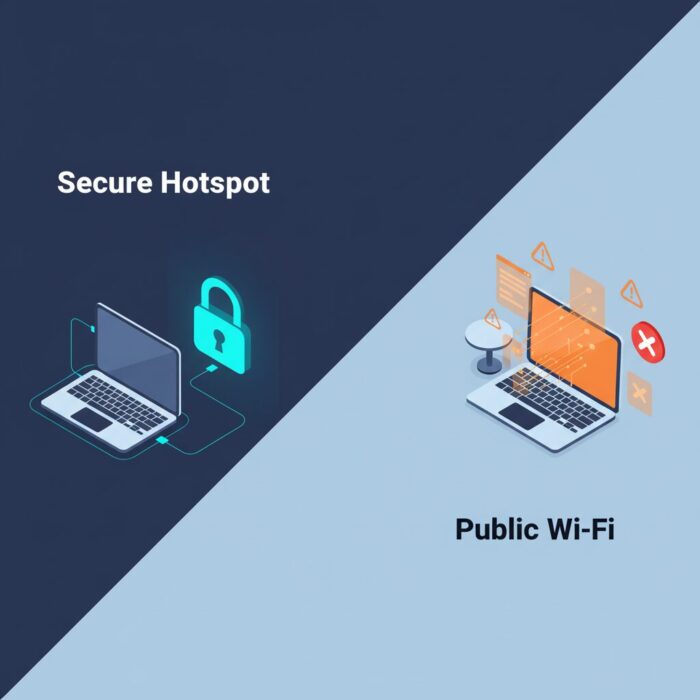
Furthermore, ensure your home router is secure. Change the default administrative password immediately—most factory-set passwords are publicly available online. Disable remote management features on your router, as these provide an entry point for external attackers. Think of your router as the gatekeeper of your digital home; keep the gate locked, the key hidden, and only grant access to those you trust.
Behavioral Security & Social Engineering
Technology is excellent at blocking automated threats, but it is often powerless against human error. I once received a “password reset” email that looked perfectly legitimate. It even carried my company’s branding. I almost clicked it. That near-miss taught me that the most dangerous vulnerability in 2026 is still the human mind.
Social engineering exploits your emotions—urgency, fear, or curiosity—to trick you into bypassing security protocols. Attackers are using AI to craft hyper-personalized messages that mimic the writing style of your boss or a trusted vendor.
Recognizing Phishing 2.0
“Phishing 2.0” uses generative AI to remove the tell-tale typos and grammatical errors that once signaled a scam. These attacks are nuanced, often referencing real projects or internal meeting times. Before you click any link or download an attachment, pause.
If an email requests sensitive information, an urgent wire transfer, or a sudden change in login credentials, verify the request through a secondary channel. Send a quick Slack message or make a brief phone call. It only takes thirty seconds to verify, but it can save your entire network from a breach.
Practicing Cognitive Security
Think of “cognitive security” as building a filter for your incoming information. Always inspect the actual email address, not just the display name.
Furthermore, be cautious about the information you share on social media. Attackers often use public posts about your hobbies, travel plans, or professional history to craft believable lures. Keep your professional and personal lives distinct. By managing your digital footprint and maintaining a healthy dose of skepticism, you become a human firewall that software alone cannot replicate.
Incident Response & Conclusion
Even with the best security posture, sometimes a breach happens. I remember the panic I felt when a suspicious login notification appeared on my phone from a city I had never visited. Because I had an incident response plan ready, I didn’t lose control.
Panic is the enemy of security. When you suspect a breach, you need a pre-defined process to minimize the fallout. Speed matters, but thoughtful action saves data.
The Immediate Response Checklist
If you suspect your credentials or hardware have been compromised, follow these steps immediately:
- Isolate the Device: Disconnect your machine from the internet. This prevents the attacker from pulling more data or deploying ransomware.
- Change Credentials: Use a secure, secondary device to change your most critical passwords—specifically your email and primary account access.
- Enable Global Logouts: If your service supports it, force a “log out of all sessions” on your account settings. This kicks the attacker off immediately.
- Contact Your IT Department: Do not try to handle a corporate breach alone. Report the event through your company’s designated security channel.
Building Your Evergreen Defense
Cybersecurity is not a product you buy; it is a lifestyle you adopt. We have covered the essentials—from securing your physical space to mastering passkeys and recognizing AI-driven phishing. My journey toward better security taught me that technology is only as strong as the human behind the screen.
The threats of 2026 are complex, but they are not unbeatable. By prioritizing these practices, you transform your digital workflow into a hardened, resilient environment. Stay curious, stay vigilant, and remember that security is a continuous process of improvement. Keep your defenses high, and your data will stay yours.